


SmartRent
4.52.84K Reviews
App Specs
- Version
- 4.10.0
- Updated On
- License
- Free
- Downloads
- 500,000+
- Developer
- SmartRent
- Categories
- House & Home
- Platform
- Android, iOS
Screenshots
 Analysis by AppCompare
For an app that can sit close to the front door, thermostat, and other parts of daily home life, convenience is only half the question. I also want to know what I can actually control, what depends on the home I live in, and whether the app makes clear choices visible. SmartRent is a free House & Home app from SmartRent, and its usefulness is tied to having a compatible setup rather than simply downloading it and expecting every feature to work everywhere.
Trust starts with the home you use it in
That distinction matters. Smart-home apps can look similar in an app store but serve different situations: some are built around a person’s own collection of devices, while others are part of a managed property’s systems. I would treat SmartRent as a practical control point for a home where its services and devices are already available, not as a universal remote that automatically discovers and manages any connected product.
The app has a 4.5 average from around 22 thousand ratings, and it has been installed over 500 thousand times. Those figures suggest that plenty of people use it, but they do not tell me whether it will fit a particular building or what controls a resident will receive. The useful question before installing is whether your property or home is set up for SmartRent and which functions have been enabled for your account.
What to check before relying on it
I would ask a property manager or household administrator what the app is meant to control before making it part of a daily routine. Is it intended for access, climate adjustments, or both? Which actions are available to each resident? Knowing the answers helps avoid the frustrating moment when an app is installed but a particular button or device is not part of your setup.
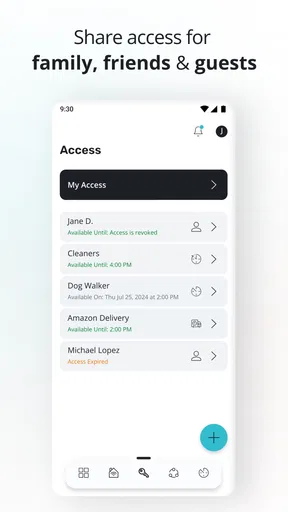
It is also worth checking the account arrangement with the person who manages the home. If you are a renter, confirm how your access is created and what happens when you move out or change roommates. In a shared household, decide who should manage account access and how everyone will handle a lost or replaced phone. These are ordinary housekeeping questions, but they matter more when an app is connected to entry or comfort controls.
Getting Started with SmartRent
First things first, setting up SmartRent is a breeze. You can find it on both Android and iOS, so no one’s left out of the fun. The installation is straightforward — just a few taps and you’re in. Once you open the app, you’re greeted with a clean, user-friendly interface. It’s designed to make even the least tech-savvy among us feel like a pro.
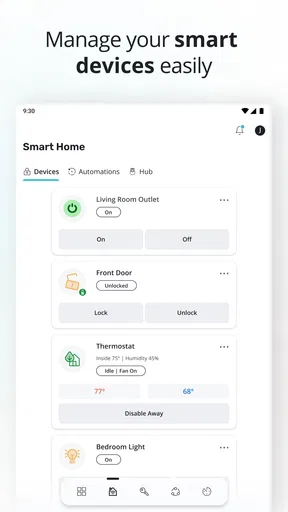
After logging in, you’ll need to connect your smart devices. This app supports a wide range of devices, from smart locks to thermostats. The integration process is seamless, mostly because the app guides you through each step with clear instructions. Seriously, it’s like having a tech expert right in your pocket!
Worth Reading Before You Choose

EA SPORTS FC Mobile 26 Is a Bigger Football Game, but It Takes Time

Flipboard Shows What News Apps Must Do Beyond the Feed

Switching to Android Auto Means Rethinking Your Driving Routine

Google Calendar Makes a Crowded Week Easier to Manage

Ludo King Makes the Most of the Minutes Between Plans

Baby Panda World Brings Quick Play to Modern Phones, but Its Game Library Feels Busy
The Features That Stand Out
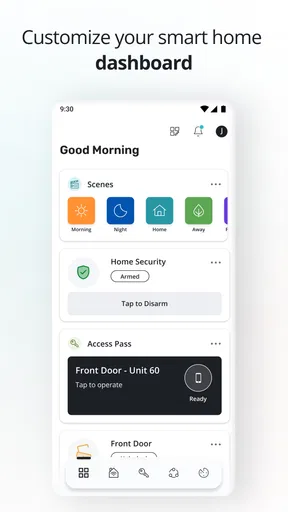
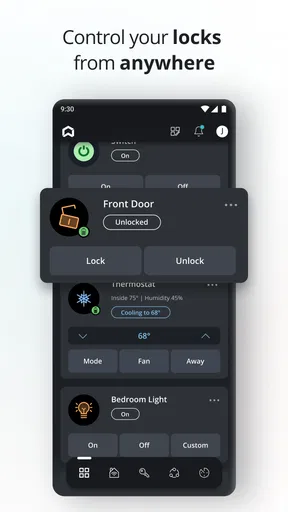
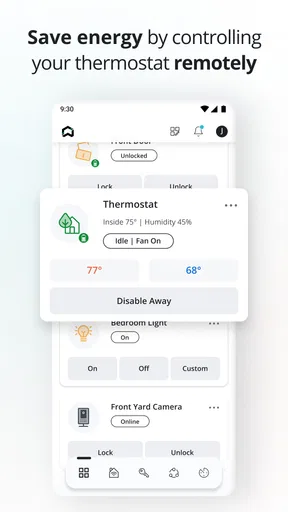
What really sets SmartRent apart is its ability to give you control over various aspects of your home, all from your phone. Imagine adjusting your thermostat without leaving your couch or unlocking your door while you’re miles away. Pure magic!
Real-time Notifications: One feature that I particularly love is the real-time notifications. Whether it’s a package delivery or a friend dropping by, you get instant alerts, keeping you in the loop at all times.
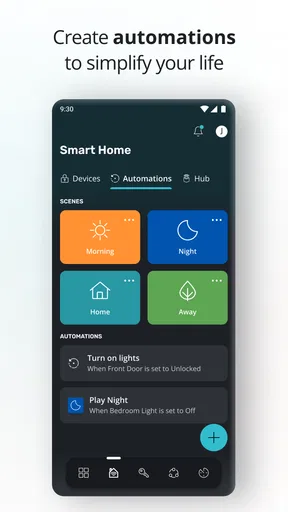
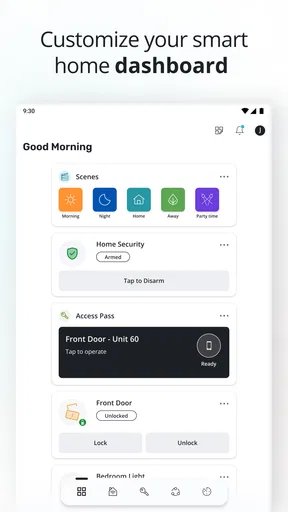
Customizable Scenes: Another cool feature is the ability to create customizable scenes. Want the lights dimmed and the temperature lowered when it’s movie time? No problem. Just set up a scene, and with a single tap, everything’s set just the way you like it.
Using alerts and scenes thoughtfully
Notifications are most useful when they answer a question you genuinely need answered. If every routine event prompts an alert, the important one can get lost in the noise. I would start with only the notices that help me make a decision—such as whether someone is arriving or a home event needs attention—then adjust from there if the app offers those choices. This is a practical way to keep alerts helpful rather than turning them into background clutter.
Scenes also work best when they simplify a routine rather than trying to automate every detail. A “leaving home” or evening setup can be convenient if the connected devices and permissions in your home support it. Before depending on a scene, I would test it while still at home and check each result. That small habit is especially worthwhile when a scene includes a door lock or a temperature change: a single tap is convenient, but it is only reassuring when you know what that tap does in your particular setup.
Data-sensitive moments and visible choices
Access and climate controls are not all the same kind of decision. Changing a thermostat setting is usually easy to reverse; unlocking a door has a more immediate effect on who can enter. I would use the app’s visible account and device controls to understand which people and functions are available to me, and I would avoid sharing login details as a shortcut for giving someone access. If another person needs to use the system, it is better to ask the home administrator how access should be arranged.
I can’t responsibly infer privacy protections from an app’s general promise or from the fact that it controls smart-home devices. Instead, I would review the permissions Android or iOS displays during setup, allow only what makes sense for the functions I plan to use, and revisit those choices if my use changes. I would also look for the app’s own account settings and privacy information before connecting devices. That is a more grounded way to judge trust than assuming every permission is necessary—or assuming none are.
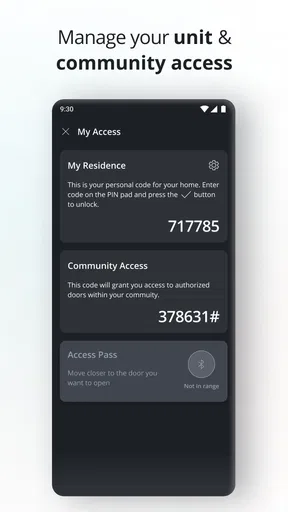
A phone notification is also not a substitute for checking a door in person or arranging a reliable backup. If the phone battery is low, the network is unavailable, or the account needs attention, I would want to know what the household’s normal alternative is. For an entry-related action, keeping that backup clear is a sensible habit, particularly for people who share a home or regularly have visitors.
Where it fits among home apps
Compared with managing separate device-maker apps, a single place for supported home controls can reduce app switching and make everyday tasks easier to remember. The trade-off is that a central app is useful only for the devices and functions included in your setup. People who have built a home around a different ecosystem may prefer the hub or manufacturer apps they already use, especially if those apps offer controls that are not part of their SmartRent arrangement.
Compared with a traditional key and manual thermostat, phone-based controls can be more convenient when you are away or juggling several routines. They also introduce account access, phone availability, and setup compatibility into tasks that used to be purely physical. I see that as a worthwhile exchange for residents whose home is configured for the service, but not an automatic upgrade for someone who only wants a basic lock or temperature control.
Who will get the most from it
The strongest fit is someone who lives in a SmartRent-enabled home and wants to use the controls their household or property has made available. It can also suit a household that benefits from a shared, consistent way to handle supported routines, provided everyone understands who manages access. A realistic use case is coming home with groceries while a family member is already inside: instead of coordinating a handoff around a physical key, a resident can use the access option available in their setup. I would still make sure every household member knows the backup plan.
It is less suitable for someone shopping for a standalone smart-home platform without checking device compatibility first, or for a person who wants complete control over a mix of products from unrelated brands. It may also not be the right choice for someone who does not want home access or climate controls connected to a phone account. In those cases, a manufacturer’s own app, an existing household hub, or conventional physical controls may be simpler and more predictable.
One useful way to decide is to list the two or three tasks you actually want to make easier, then confirm that your home’s SmartRent setup covers them. That avoids choosing an app for an imagined smart home rather than the one you live in. It also gives you a clear test after installation: if the app reliably helps with those specific routines, it is earning its place on your phone.
Living with SmartRent: A Daily Experience
Using SmartRent daily has been a revelation. It simplifies managing my home in ways I hadn’t imagined. The app’s performance is smooth, with transitions between tasks happening without a hitch. Honestly, I’ve forgotten what life was like before having this nifty app.
What really makes it a winner in my books is its reliability. I haven’t encountered any significant glitches, and updates are rolled out regularly to enhance user experience. Plus, the customer support is responsive, which is always a huge plus.
Practical expectations and small frictions
My main caution is that a smooth app experience cannot remove the dependencies around it. Your account must be set up correctly, your home must support the controls you want, and your phone needs to be available when you choose to use it. If a control is missing, I would first check the home’s configuration and account access rather than assume the app itself is broken. That distinction can save time when troubleshooting.
SmartRent is free, carries an Everyone age rating, and its current version is 4.9.4. It was released on September 7, 2017, and the listed minimum operating system is Android 8.0. Those details make it easier to judge basic compatibility, though the practical test is still whether your own phone and home setup support the functions you need. I would check compatibility before planning to depend on it for an important routine.
Final Thoughts
So, is SmartRent worth it? Absolutely! It’s an app that not only meets but often exceeds expectations. It brings convenience, efficiency, and a touch of futuristic flair to everyday living. If you’re looking to make your home smarter and your life easier, this app is a fantastic place to start.
Ready to dive into the smart home revolution? Go ahead and give SmartRent a whirl. Trust me, you’ll be glad you did.
A cautious recommendation
I would recommend it to a friend when their home already uses SmartRent and they want an easier way to reach the controls available to them. I would not recommend treating it as a guaranteed all-in-one solution before confirming the property setup, device access, and account arrangements. The most important question is not whether phone control sounds appealing; it is whether the controls you personally need are enabled and easy for your household to use.
For me, that makes SmartRent a promising convenience rather than something to trust blindly. Start with one low-stakes routine, learn what each control changes, and make sure everyone who shares the home understands access and backup options. If those basics feel clear, the app can earn a useful place in everyday home management. If they do not, sticking with the home’s existing controls is the more sensible choice.
Pros
- User-friendly interface for easy navigation.
- Seamless integration with smart home devices.
- Real-time alerts enhance home security.
- Remote control access from anywhere.
- Energy-saving features reduce utility costs.
Cons
- Limited compatibility with older devices.
- Occasional connectivity issues reported.
- Some features require premium subscription.
- Setup process can be time-consuming.
- Limited customer support availability.
FAQs for SmartRent
What is SmartRent, and how does it work?
SmartRent is a comprehensive smart home automation app designed to enhance residential property management. It allows users to control various smart devices such as locks, thermostats, and lights from their mobile devices. By integrating with existing smart home systems, SmartRent provides seamless management and monitoring, making it ideal for both tenants and property managers.
Is SmartRent compatible with all smart devices?
SmartRent is compatible with a wide range of smart devices, including popular brands like Google Nest, Amazon Echo, and August Smart Locks. However, compatibility may vary based on the specific model and firmware. It’s advisable to check the compatibility list provided by SmartRent to ensure your devices can be integrated smoothly.
How secure is the SmartRent app?
Security is a top priority for SmartRent. The app employs advanced encryption technologies to protect user data and ensure secure communication between devices. Additionally, SmartRent regularly updates its security protocols and features to safeguard against potential vulnerabilities, making it a reliable choice for managing smart homes.
Can I use SmartRent for multiple properties?
Yes, SmartRent is designed to support multiple properties, making it an excellent tool for property managers. The app allows users to manage and monitor different locations from a single interface, providing streamlined control and oversight. This feature is particularly beneficial for managing large rental portfolios efficiently.
Do I need a subscription to use SmartRent?
SmartRent operates on a subscription-based model, offering various plans tailored to different user needs. While basic features may be available for free, premium functionalities like advanced device management and analytics typically require a paid subscription. It’s recommended to review the pricing plans to select the best option for your requirements.


